5 JSON Formatting Tips Every Developer Should Know
Master JSON formatting with these essential tips. Learn about validation, minification, and common pitfalls to avoid.
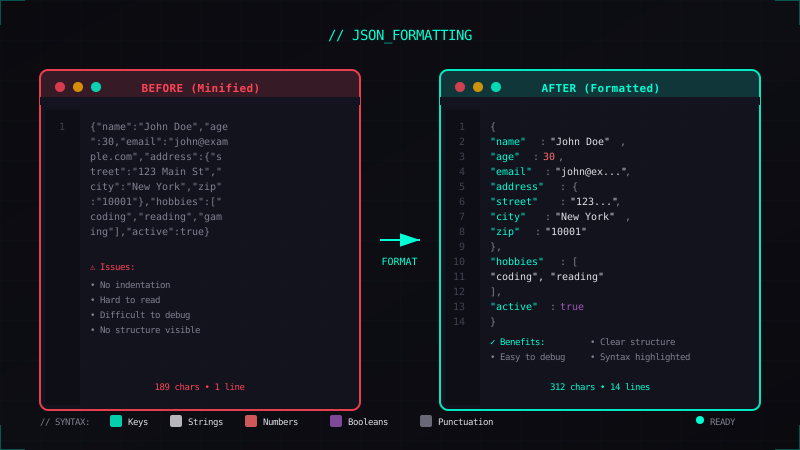
JSON (JavaScript Object Notation) is everywhere in modern development. Whether you're working with APIs, configuration files, or data storage, you'll encounter JSON daily. Here are five tips to work with it more effectively.
1. Always Validate Before Parsing
Invalid JSON is a common source of bugs. Before parsing JSON in your code, validate it:
function safeParseJSON(str) {
  try {
    return JSON.parse(str);
  } catch (e) {
    console.error('Invalid JSON:', e.message);
    return null;
  }
}
Common JSON mistakes include:
- Trailing commas (not allowed!)
- Single quotes instead of double quotes
- Unquoted property names
- Comments (JSON doesn't support them)
2. Use Proper Indentation for Readability
When debugging or reviewing JSON, proper formatting makes a huge difference:
{
  "user": {
    "id": 123,
    "name": "Alice",
    "roles": ["admin", "user"]
  }
}
vs the minified nightmare:
{"user":{"id":123,"name":"Alice","roles":["admin","user"]}}Try our JSON Formatter to instantly beautify your JSON:
3. Know When to Minify
While pretty-printed JSON is great for development, minified JSON is better for production:
- API responses: Smaller payload = faster transfer
- Storage: Less disk space and memory
- Caching: More consistent cache keys
The size difference can be significant:
| Format | Size |
|---|---|
| Pretty | 2.4 KB |
| Minified | 1.1 KB |
| Savings | 54% |
4. Escape Special Characters
When embedding JSON in strings or HTML, escape these characters:
| Character | Escape |
|---|---|
" | \" |
\ | \\ |
| Newline | \n |
| Tab | \t |
const data = {
  message: "Line 1\nLine 2",
  path: "C:\\Users\\name"
};
5. Use JSON Schema for Validation
For complex applications, define a schema to validate JSON structure:
{
  "$schema": "http://json-schema.org/draft-07/schema#",
  "type": "object",
  "required": ["name", "email"],
  "properties": {
    "name": { "type": "string" },
    "email": { "type": "string", "format": "email" }
  }
}
This catches errors early and documents your data structure.
Bonus: Useful Tools
Here are some DevTools Suite tools that help with JSON:
- JSON Formatter - Format and validate JSON
- JSON to TypeScript - Generate types from JSON
- YAML/JSON Converter - Convert between formats
Happy coding!